
Your creative workspace, powered by AI agents
Your ideas. A whole studio to make them.
OpenMontage Studio is a desktop app for Windows. Describe the video, image, sound or animation you want, and AI agents plan it, make it and edit it with you. Start from an idea or bring your own material.
- Windows desktop app
- Private alpha · beta invites from the waitlist
- Works with Claude Code and Codex
- No watermarks
Make a 60-second launch video for our monitoring tool. Use the brand kit and the dashboard recording. Developer audience.
Made with OpenMontage
Get to your next creation now


How it works
Start with an idea or something you already have. Make a film. Clean up audio. Create a visual. One workspace. Every step yours to direct.
Every stage, in the open.
Nine steps from brief to finished film. You see each one, and nothing is generated until you approve the plan.
-
Step 1 · BriefDone
Give the context that shapes the brief.
- Audience
- developers & platform teams
- Length
- 60 seconds
- Tone
- confident, plain-spoken
Key messages
- Detect before your users do
- Explain the why, not just the what
- One-click fix from the alert
-
Step 2 · ResearchDone
It does its homework first.
- 12 product screens captured for screen scenes
- 4 reference launch films: pacing and cut lengths studied
- What competitors claim, side by side
- Positioning draft: “the dashboard that pages you first”
Findings saved where you can read them
-
Step 3 · ScriptApproved
A screenplay, not a caption.
Scene 3 · The dashboard
Voice-over: Your dashboard shouldn’t be the last to know.
[Footage: latency graph spikes; cursor hovers]
Voice-over: Trellis watches every endpoint. So you don’t have to.
14 lines · 58 seconds read aloud
-
Step 4 · Scene planMixed
The right method for each scene.
Scenes 1–6
Screen recordingScenes 7–8
Motion graphicsScene 9
Generated clipYour own files, your library, stock or generated, proposed scene by scene and yours to change.
Rough sketches before final generation
-
Step 5 · Your approvalWaiting
See the whole production plan first.
Waiting for your approval
- 8 generated images
- model chosen
- Narration · 60s
- voice chosen
- Music · “Focused Build”
- track chosen
- 1 generated clip · 5s
- model chosen
- Captions · stock · render
- ready
-
Step 6 · NarrationReady
A voice you can give notes to.
Calder · warm tenor · English
…detect the spike, Trellis watches every endpoint, so you don’t have to…
Select a sentence to give notes on just that part
-
Step 7 · MusicChosen
Music chosen for the cut.
♫ “Focused Build”1:04
Picked from the starter library by mood, tempo and energy. If nothing fits, Studio writes one for the film.
-
Step 8 · AssembleDone
Assembled to your brand.
- Captions, timed to each wordchecked
- Brand colours and fonts appliedbrand kit
- Media, licences and lengthreviewed
Put together on your computer. Watch a draft before the final render
-
Step 9 · RenderReady
The formats you need. Yours to keep.
Rendered on your computer, without a watermark, with a record of where every image, clip and sound came from.
Works with the AI you already use
Your workspace. Your choice of agent.
Work in OpenMontage Studio, or use the same creative tools from an AI agent you already work with. Bring your own AI and media-provider accounts.
- 01
Create in OpenMontage Studio
Describe what you want, review the work and direct changes in the desktop app. Your materials and productions stay together.
- 02
Bring your own models
Connect your own media-provider accounts and supported local tools. What you can make depends on your setup.
- 03
Or use your existing agent
Add the OpenMontage plugin to Claude Code or Codex and use the creative tools in the conversation you already have.
In private alpha on Windows. Beta invitations go to the waitlist in small groups.
Same tools and skills, whichever agent you use
The desktop app
OpenMontage Studio.
Your creative workspace for research, recording, generation, editing and delivery. Ask for a complete production or one focused task, review the results and keep directing the work in one conversation.
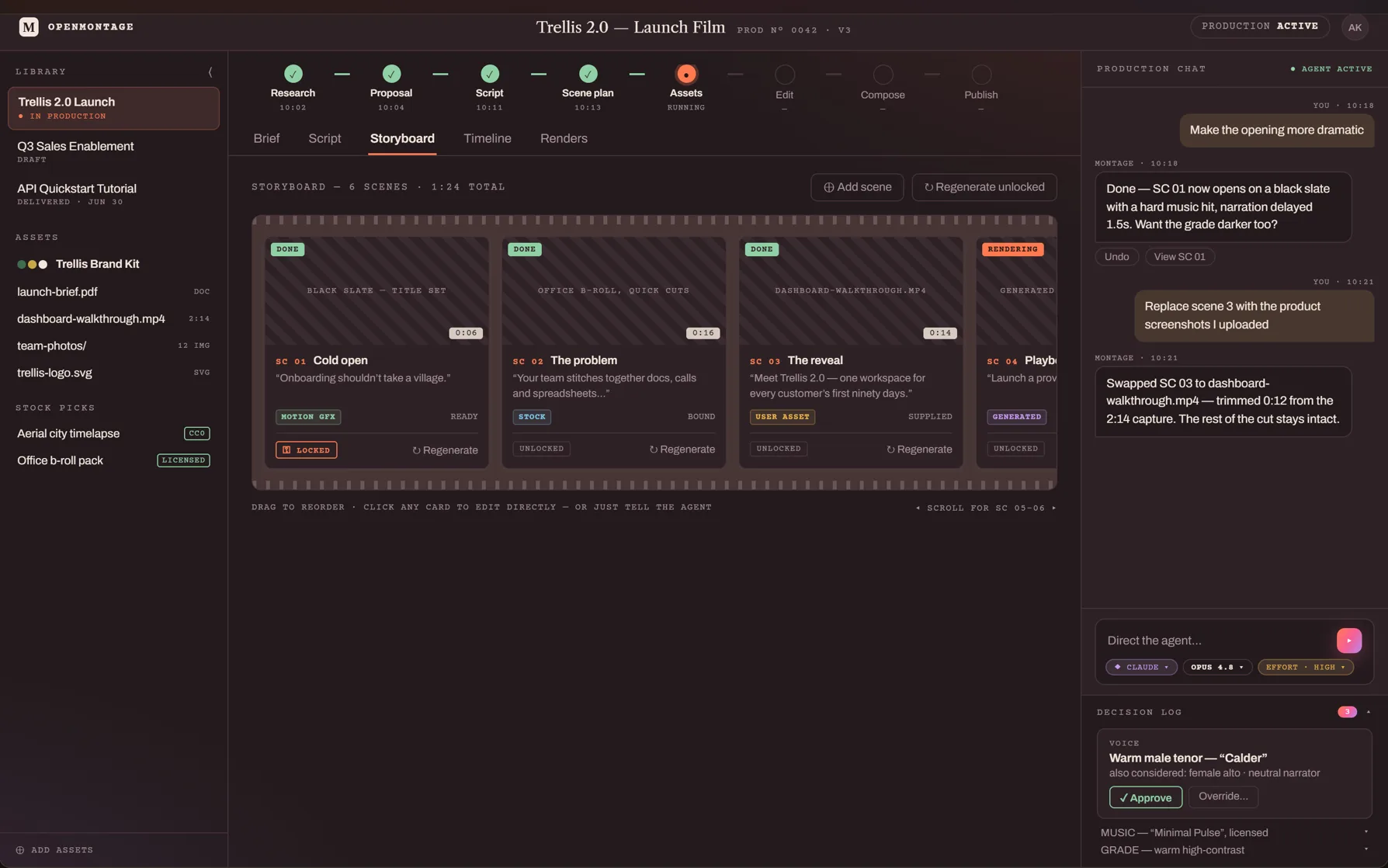
A storyboard you steer
Each scene is a card. Click one and tell the agent what to change.
The plan, laid out
The full script, scene plan and the exact method for each scene, before anything is generated.
Voices you can direct
Read the narration as text, select one sentence and give notes on just that part.
Every format
Wide, square and vertical, with captions, other languages and a record of every source.
No lock-in
Yours where it counts.
Your productions are ordinary files on your computer, yours to keep. Choose your agent and your providers, and keep control of the whole workflow.
- 01
Runs on your computer
Your studio runs locally. You decide what goes to the cloud.
- 02
Bring your own agent
Claude Code or Codex, with your own account. Bring your own keys and providers too.
- 03
Nothing gets lost
Every generated file, and the record of how it was made, stays attached to the scene that asked for it.
- 04
No watermarks. Ever.
Your work stays clean, editable and exportable in every supported format.
- 05
Steer every step
Brief, script, scene plan: everything the agent makes is a document you can read, question and change.
- 06
Switch any time
Change providers, use free local tools or use OpenMontage credits. Your files stay yours.
Questions
Before you join
What will it cost?
Waitlist members get free access for 90 days. Subscription plans are still being made, and we’ll share them with the waitlist. You can also use free tools that run on your computer, or your own accounts with media providers.
What computer do I need?
A Windows computer. Most things run on any laptop or desktop with no graphics card. A few free local tools need specific hardware; the capabilities page says which.
When do I get access?
Studio is in private alpha now. Beta invitations go to the waitlist first, in small groups. Join below and we’ll email you when your place opens.
What happens to what I make?
It stays on your computer as ordinary files, with no watermark. Studio keeps a record of where each image, clip and sound came from, so you can check how you may use it. When you use a provider’s model, that provider’s terms apply too; our terms cover the rest.
Do I need my own AI account?
Studio’s agent runs on Claude Code or Codex, using your own Claude or ChatGPT account or an API key. If you already use one of those agents, you can connect it to the same tools instead.
Be on the crew.
OpenMontage Studio is in private alpha. Join the waitlist to create, edit and explore with us in the beta.
By joining, you agree to receive emails about the OpenMontage beta. You can opt out anytime by emailing hello@openmontage.video. See our Privacy Policy.